
Set up your family
Create your family circle in the app and invite the people who help.
 Skip to content
For families caring from a distance
One simple daily check-in gives you peace of mind. If it doesn’t arrive, KinStatus shows you it’s time to check — with last-known location and battery for context.




Caregivers: iPhone & Android · Loved one’s app: Android
Watch
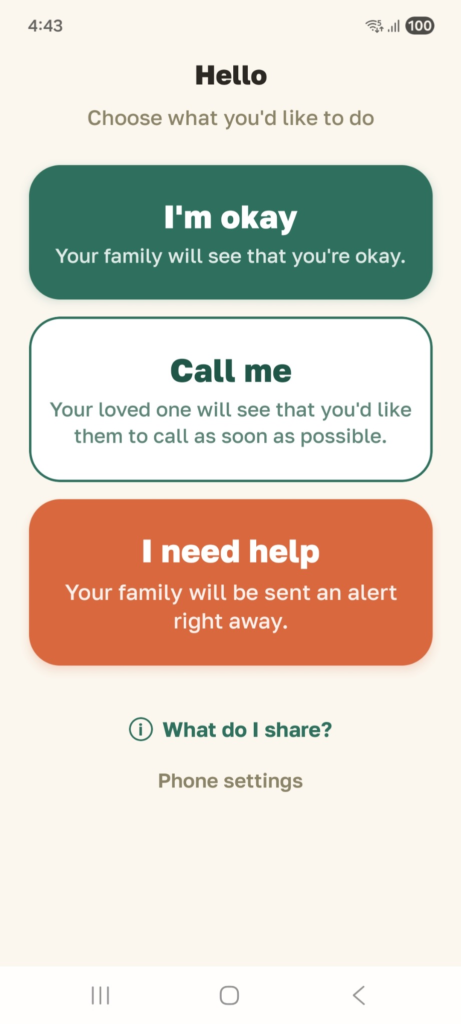
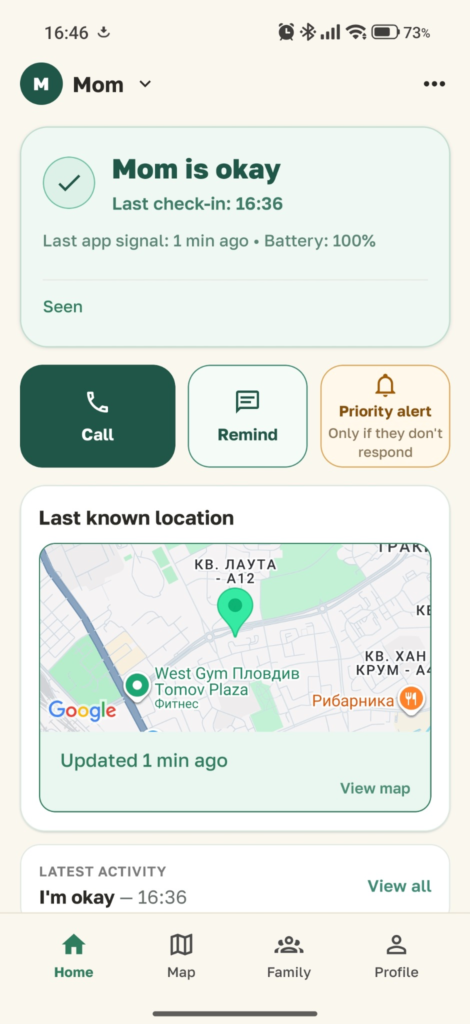
See how daily check-ins, family alerts, last known location and phone status work together — without hidden tracking.
Simple setup
Create your family circle in the app and invite the people who help.
Your loved one enters a short code — knowingly, together with you.
One tap from them, one calm view for you — with context when attention is needed.
Set it up in minutes and stay connected from day one.
If a check-in is missed
Most days, KinStatus is a quiet green check. On the day it isn’t, the family dashboard shows an Attention state with the context you need.
A calm Attention state shows that the expected check-in has not arrived.
Last-known location, battery and last activity can help the family understand what the phone is reporting.
Call, send a reminder, or ask someone nearby to check in.
A low battery or a phone that has stopped updating can give you useful context before you decide what to do next.
KinStatus supports family awareness. It is not an emergency or medical service.
Caring from a distance
You live away from home. Mom lives on her own. You don’t want to call every morning just to make sure everything is fine. KinStatus gives your family one simple daily signal — and shows you when that signal is missing.
Our promises
Who it is for
You’re in another city — or another country. A simple daily check-in reduces the uncertainty of wondering why Mom or Dad has not answered.
Support a parent living alone and share the care with siblings and trusted helpers.
Reassurance without intruding. A check-in, not a check-up.
Get started
Set up KinStatus in minutes and get a simple daily signal that she’s okay — with status, last-known location and battery when you need context.
Questions? support@kinstatus.app
We use essential cookies to make this site work. With your consent, we also use analytics and marketing technologies to improve KinStatus and our advertising.